• Skip to content
logo logo
  • Blog
Login SIGNUP

cybersecurity

What is phishing? Everything you need to know to prevent and fight it

June 26, 2019 by HushApp Team

What is phishing? Everything you need to know to prevent and fight it

Have you ever been a victim of fraud via email? This type of fraud is known as phishing and is becoming more common and dangerous every day. It is a method used by cybercriminals to deceive users, showing them information that seems like it comes from a known company, thus, they get confidential information such as credit cards, social security numbers or bank account numbers.

They usually send you an apparently corporate email (for example, an email from your bank) where they will direct you to a fake website, and kindly ask you to update your password, validate information about an account, or the most attractive ones offer you gifts, among other things, which will then allow hackers to keep your data. 

In some cases these attacks are easy to detect, however, in the day to day especially during working hours, we do not have time to look at small details. Spelling errors, unofficial URLs of companies that claim to be, or sometimes very similar addresses but not exactly the same, are the main indication that something is wrong. 

There are not only produced via email we can find several types:

Types of phishing attacks: 

  • Deceptive Phishing: This is the traditional type that we described above, the aim of the attacker is to obtain personal information from the user either by trying to get the user to provide it or by redirecting it to a fake website in order to obtain said information.
  • Spear phishing: This type of attack is usually more personalized and may include more personal information such as the name of the victim, phone or workplace. Spear phishing can come with names of known people, where they tell you that they attach a file that may be common for you, but this can be infected. These types of attacks are much more difficult to detect.
  • CEO Fraud: It works in the same way as Spear phishing, but in this specific case, the attacker pretends to be the CEO or someone with a relevant position, where they requests confidential information and that the employee will believe that must be given as someone with decision-making power in the company. 
  • Smishing: This type of attack is produced by SMS. They usually offer prizes and to receive it, the victim has to click on a link, reply to the message or call a phone number.
  • Vishing: This type of attack differs by being through a typical telephone call, where the attacker, as well as via e-mail, seeks to obtain certain personal information. 
  • By search in the browser: the fraud occurs in the same way with a fake site, but in this case, the hacker uses SEO and SEM techniques to position his false site and thus the user finds them among the first options of what you are looking for 
  • Pharming: This type of attack manipulates the hosts files or Domain Name Systems (DNS) to redirect a specific domain name to the one chosen by the cyber-attacker. 

What to do to prevent it?

  1. Recognize and identify a possible phishing: some details that can help us detect an email of this type: 
  • The URL address is different from the official website of the company where it says it is. The difference can be minimal: an “i” in uppercase (I) looks like a lowercase “L” (l).
  • They usually offer gifts or ask to update data, which is rarely requested in this way. 
  • Check the wording and language: often this type of emails have some details in the wording or language, if you see an email from your bank written in another language, this can be a clear sign of phishing.
  1. Enter your confidential data only on secure websites: In addition to checking the domain, check that the website is secure and that it starts with https: //
  2. Use two-factor authentication for all the services that allow it, especially for those who handle financial information. 
  3. Check the shortened URLs: if you see an abbreviated URL on a social media or it arrives by mail, there are websites that allow you to see the full address, that will allow you to see where you are redirected. 
  4. Open documents with other online documents viewer such as Google Drive: If it is usual for you to receive files from different contacts, you can open it first in an online document reader which will prevent some malicious software from being installed on your device. 
  5. Frequently update all the operating systems, browsers and applications that you use, thus avoiding vulnerabilities. 

Cyber ​​attacks are becoming more sophisticated every day and we can easily be deceived, but if we take the necessary preventive measures and are aware of how they are evolving, we can go a step further and thus reduce the risk of being the next victim. 
Filed Under: Cybersecurity Business Tagged With: CEO Fraud, Cyberattacks, cybersecurity, fraud, password, Pharming, phishing, Smishing, social media, Spear phishing, two-factor aunthentication, Vishing

Encrypting files: What kind of information should your company protect?

June 12, 2019 by HushApp Team

Encrypting files: What kind of information should your company protect?

Every time it becomes more common to hear that a company must pay a fine for not complying with data protection regulations in Europe in particular, the GDPR has become one of the major concerns of organizations. It is clear that data should be protected, the question is, what should we protect? And also, why encrypting files is the best way to protect your company?

Frauds, phishing, cyber attacks, data leaks, malware, among others, are terms that are becoming increasingly common; they are attacks to which any company or person is exposed to suffer at any time. To understand the consequences of this type of attack, you have to understand the causes of the problem, the information that the company deals with and how it is handled.

Personal data and privacy

Although it is not the only information that a company should protect, it can be considered the most valuable and at the same time vulnerable data that an organization manages. It is about everything that concerns the identity of a person, whether public or private, and each one decides whether it can be shared or not.

Everything that refers to personal data such as: contact data, physical characteristics, data related to your assets, biometric information, professional training, including ideological information, sexual life or ethnic origin, among others, refers to information that if reach the wrong hands, It could affect their reputation or safety.

It is not only about personal information but also about confidential information of the company that is also susceptible to a security breach and could cause serious financial problems.

What should be done with the information obtained?

It is the responsibility of the company to safeguard the integrity of the people from whom it handles such information. This refers to any type of action taken with these data: the way it is collected, processed, stored, transferred or even destroyed.

Therefore, the procedure should be:

  • Know the type of information handled.
  • Classify it according to its value, if it should be public, private and above all, who will have access or not.
  • Identify which are the possible threats and the possible consequences.
  • Apply the necessary tools for the protection of information, especially the most confidential one. In this step is where encrypting files is useful.

Encrypting files: Classification and examples of information that must be protected

Some examples of information that must be protected with encryption systems can be:

– Company files: sensitive data for the company such as business secrets, bank documents, including passwords that give access to confidential documents, corporate devices, credit cards, market studies, etc.

In the case of personal files could involve employees, customers or any other person related to the company. Some examples include:

– Employee files: personal data of employees (such as those mentioned above), identification documents, medical reports, etc.

– Client files: Identification documents, payment data, contact data, among others.

In the case of clients, it is important to understand the obligation to protect the data they are offering and should be used only for the purpose they decided. Therefore, if you are requesting a client’s email to subscribe to the company’s newsletter, it should be used only for that and not for other purposes. For example, to promote other products of another company, since this can be sanctioned in many countries.

Why encrypt the files?

Encrypting your files can be one of the best options to protect the sensitive information of a company. Nowadays, the most used and effective method to protect your data is an encryption system, in which you can secure that information is completely protected.

It is important to highlight the level of security offered by an encryption system. It is a much more powerful tool than a password since they only protect access. Encryption protects data directly, making it impossible to see the contents of files.

Encrypting files easily with HushApp

To comply with all data protection regulations that each country requires, it is important to use the appropriate security tools.

That’s why we introduce you the HushApp. It is a safe alternative to other file submission services, since it facilitates the daily protection of company data and helps safeguard your customer’s sensitive information.

How? Implementing high-level encryption methods in a simple and transparent way for the user without affecting the efficiency of business processes. Security, usability and a good user experience are all our priorities.

Using HushApp you will have the opportunity to offer additional value to your customers, protect your own confidential information and allow your work team to perform easily and safely actions.

We invite to try HushApp …

Filed Under: Cybersecurity Business Tagged With: confidential files, cybersecurity, data protection, encrypting, encryption, GDPR, HushApp, personal data, privacy

10 Cybersecurity measures to use Instagram safely without compromising your privacy

May 17, 2019 by HushApp Team

10 Cybersecurity measures to use Instagram safely without compromising your privacy

Recently we discussed the influence that social media have on our daily lives, particularly on Facebook. Instagram is a social media that has become increasingly popular, and the more popular it becomes, the more security risks we have when using it. Therefore, before starting to publish your favorite photos of your trips and your favorite dishes, take into account some security measures to use Instagram safely.

Instagram is undoubtedly the social media preferred by young people today, for the large amount of visual content that is published, as well as the immediacy of their publications, especially on the Stories. However, it does not stop being a focus of attention for hackers if it is not used correctly.

How could the misuse of an Instagram account affect your security? Small details such as simply having an open account, or connecting from a public Wi-Fi can bring you serious consequences, such as being a victim of fraud or data leakage.

Therefore, it is better to take security measures, from the most basic to some specific settings of the application.

How to use Instagram safely?

  1. If you do not have an Instagram yet and you are thinking about having it on your mobile, the first thing you should do is to download it from the official stores (Play Store, Apple Store, etc). Avoid downloading it from another site.
  2. After having your account, or if you already have it, the basic rule to use Instagram safely is to use the private account mode, so only those who want you choose can access you. If you want to leave it public because you want to promote it, make sure you do not publish any personal information that could compromise your security such as travel photos where you and/or your relatives appear, photos of children, etc.
  3. As in other social media (and in real life), if your account is personal and not for any promotional purpose, just accept to be followed by people you know, remember there are false accounts. In the same way, these false accounts will try to write you by direct messages to try to connect with you, if you do not recognize them, you can reject the request and they won’t be able to contact you.
  4. This privacy option is also available for Stories, Instagram allows you to create a group called “Close friends”, with that option you can select who of your followers will be able to see your Stories.
  5. We have repeated many times how dangerous it can be to connect to a public Wi-Fi without taking the appropriate security measures. Avoid doing it this way, since this is the easiest way for hackers to steal your user and password and access your account.
  6. It is important to be careful with third-party apps, if you want to know is a third-party app is reliable, you should consider some important details, for example: when you register with third-party app, it must show you a URL like this “https://instagram.com/, as well as show you the typical Instagram form to enter username and password (it must be the same as the login of the original app). Do not enter anything if you do not comply with these conditions.
  7. To add more security and using your Instagram safely, activate two-factor authentication, so every time you log in your account, you must enter in addition to your username and password, a code that will be sent to your mobile.
  8. Check the information of doubtful accounts: one of the security options that Instagram has recently added is to be able to review information about accounts with very large audiences (not necessarily public brands or personalities). When entering the profile of these accounts you just have to click on the three points that are in the upper right corner, and there you can click on “About this Account” and access to this information.

This option is not available for all accounts, but those that do have it allow you to verify things like the country (which can help you know if it shows a false location in their posts) date joined, or former usernames.

  1. The blue checkmark is also a way of knowing that the account is verified and that it is indeed the personality or brand they claim to be.
  2. If, on the other hand, you would like to verify an account, you must send a request through Instagram, but take into account that sending the request will not guarantee that it will be verified. After your application has been reviewed, you will receive a confirmation or rejection notification in the notifications tab. Instagram will never request payment for verification or contact you in any way for you to confirm it.

If you still have doubts it is always good to consult the Instagram help center. The important thing is to know the risks to which you are exposed to using this network and how to use it responsibly to enjoy its advantages.

Filed Under: HushApp Tips Tagged With: cybersecurity, Facebook, Instagram, Instagram safely, privacy, social media, two factor authentication

Cybersecurity for remote workers: benefits, risks and how to solve them

May 3, 2019 by HushApp Team

Cybersecurity for remote workers: benefits, risks and how to solve them

Remote workers are already a business reality, and all companies should know how to manage them. Undoubtedly, this way of work brings benefits for both parties: the employee earns labor flexibility, and the employer can save on expenses that require having more employees.

The statistics confirm these benefits, according to a study carried out by the cybersecurity company OpenVPN, in which 250 IT managers were interviewed, 82% claim to have less stress working in this way, and 30% acknowledge that it allows them to do more work in less time.

Despite the benefits that the home office brings, this method has its disadvantages and can be very dangerous. 90% of IT managers recognize that having remote workers can be a risk to the security of the company. Furthermore, 54% consider that they represent a greater security risk than employees who work in the company itself. Even more alarming, 36% of organizations admit that they have suffered a security incident due to the actions of a remote worker.

It is possible to continue maintaining the benefits that home office brings us in a secure way, as long as the company follows some cybersecurity measures.

Cybersecurity measures for companies with remote workers

1) As with all IT security issues, the main thing is to know the risks to which they are exposed. Therefore, education in cybersecurity for employees should be fundamental, especially for remote workers and it should be part of the corporate culture.

Security policies must be established that clearly explain to employees how to handle sensitive information, especially those that are not within the workplace.

2) Establish basic measures of information security: using VPN, which will also allow the company to monitor who is connected, from where and what they have done. Teaching employees to use strong passwords or avoid using public Wi-Fi networks while they are connected from company devices. in case they have to, following the necessary security measures.

3) Classify the information that requires most protection: the company should review what type of information is accessible according to the profile of the worker, and if it is really necessary to have permission to modify it or it is enough to be allowed to view it.

4) Control devices that store sensitive information: the company must restrict access to information from devices that do not have the security tools established for their protection.

5) Install and maintain updated security solutions on all devices, in order to protect the company from possible malware or other types of cyber threats.

6) It is also important to avoid using computers or personal devices inside or outside the company since these are not controlled by the established security measures.

7) It is advisable to use remote desktops since it allows the employee to connect directly with the company’s servers.

8) Of course, all sensitive information must remain encrypted, this adds a layer of greater security and prevents a possible data leak, even when sharing it with remote workers, customers, suppliers, etc.

That’s why HushApp is the ideal option to manage communication with remote workers, it is a tool that allows you to share files in an easy and totally secure way, even without it being necessary to sign up in the application. It does not require installation since you can access it through its website or through the Android app.

HushApp is thinking to facilitate teamwork protecting the sensitive information of companies.


We invite you to try HushApp …

Filed Under: HushApp Tips Tagged With: cyberattack, cybersecurity, data leak, encryption, HushApp, information security, IT, Remote workers, VPN

We have news in HushApp that we want to tell you!

April 17, 2019 by HushApp Team

We have news in HushApp that we want to tell you!

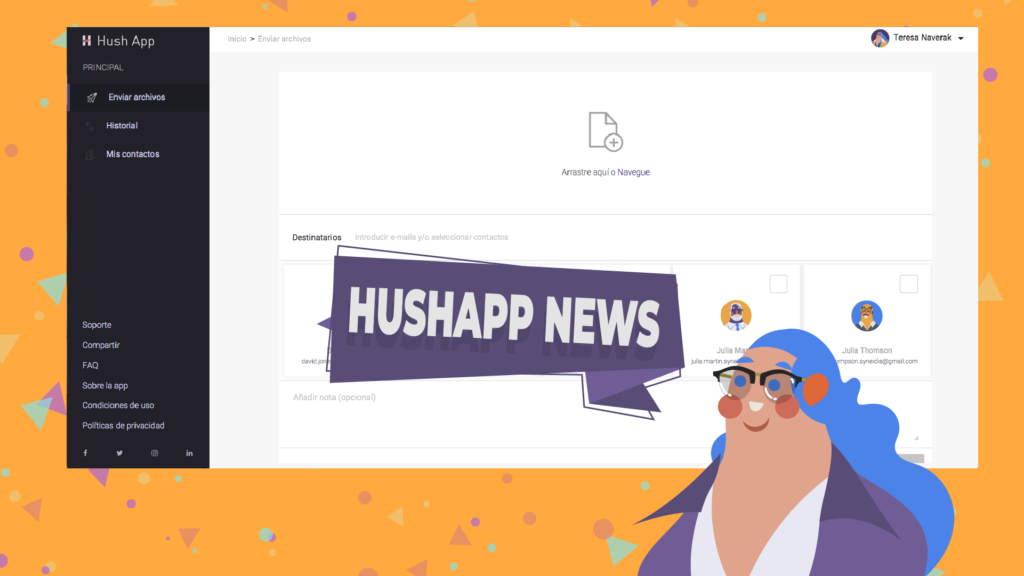
We have news in HushApp! Yes, because every day we work hard to make your experience better and better, so we decided to take this space to tell you about all the improvements we have made to our web version until today.

We are constantly changing, always looking for HushApp to be easy to use and at the same time secure enough to protect the privacy of your files. That’s why our team is committed to making this app as user-friendly as possible and our mission is to keep your information safe.

What’s the news in HushApp?

Here is a summary of what we have improved for you …

  • Some changes in the transfer process: as part of the progress in the user experience, we have improved this functionality, since it is one of the most features of the app. Now the send button is active from the moment you add a file. If you click on it, it will validate the recipients and show you some warnings and indications in case they are necessary, so you know at all times what you have to do.
  • Messages at the beginning and at the end of the encryption process: When you make a transfer, a message will appear at the beginning and at the end of the process, indicating the number of files you are sending and the number of recipients that you chose. A way to better visualize what you send and who you send it to.
  • We improved the password field to transfer to unregistered users: As you know, in Hushapp you can send your files even to people who do not use the application and are still protected. To do this, you must create a password and send them by other means, so that they can receive your files securely. We have facilitated this process in several aspects:
  • Now you can see an information button, which opens a drop-down and explains what you should do when you send a message to unregistered users.
  • We also have a more descriptive placeholder, so you know where and what you should enter in this field.
  • We also added an eye icon that allows you to hide or show the password, so you can see what you write, if you are in a secure environment.
  • The history of transfers received shows you the expiration of each transfer: now you know how much time you have left to download the files that were sent to you.
  • The clickable area to add files to a transfer: A larger space to click and add your files, which makes the sending process faster and easier.
  • Improvements for companies and work teams: On this issue, at Hushapp we are working hard to improve the experience for work teams. One of the improvements is now you can send a reminder to a colleague to complete the registration process.

To explain it in simpler words, if in a company all employees use HushApp and someone tries to send a file to a colleague who has not yet completed the registration process, HushApp will send a reminder to them to activate their account, thus they will be able to receive the files in a secure way.

Take a look at our web version and feel free to leave comments on what you think about this news in HushApp!

Filed Under: HushApp News, Sin categorizar Tagged With: cybersecurity, encryption, HushApp, password, send files, send files securely, Syneidis

9 tips to use Facebook safely and not compromise your privacy

April 3, 2019 by HushApp Team

9 tips to use Facebook safely and not compromise your privacy

Social media has changed the way we communicate today, but it is still controversial as far as user safety is concerned. Facebook is the best example, not only because of the immense number of users it has but also because of the conflicts that the company has experienced recently, which leaves the level of privacy of its users in question. Despite this, some are reluctant to leave the popular network, since it has become an essential way of communication for them. Therefore, the question arises: Is it possible to use Facebook safely without compromising privacy?

These questions are also raised by the imminent need of parents to protect their children, who are regular users of the popular network. However, cyber attacks become more advanced each day and anyone can be the victim of cybercrime through social media: fake news, phishing and other types of fraud frequently occur, and even the most cautious user, can fall into one of them.

It’s time to sharpen your eyesight and go one step ahead of cyber attackers, you can continue to use Facebook safely, by following some simple steps:

How to use Facebook safely? From the basic to the most advanced configurations:

1) Do not accept friend requests from strangers: The first step is to control those who have access to what you publish, therefore, by common sense, it is better to only accept people you know. It is important that parents educate children and make sure that young people do not accept requests from strangers.

2) Set up your profile so that only your friends can see your publications, you can even select specific people to see or not each publication.

3) Avoid publishing information related to your location. Some people use geolocation to show where they are on vacation for example, in any case, if you want to do so, add the photos after returning home, when you are no longer in the place you show.

4) Do not post your phone number, address, names of children or pets, this can be an easy clue for cybercriminals to guess your passwords.

5) Control who can connect with you: If you enter the section “Settings” and then “privacy”, you can control who can connect with you. There you will have several options that you can define in terms of who can see your activity and how they can contact you, for example: you have the option to receive friend requests from everyone or just friends of friends. Previously, Facebook had a “preview” option to know how your profile looked for other users. However, the same platform announced this function is disabled, due to a security incident with this tool.

6) Check the permissions of the apps and websites: In this section, you can see and control the applications and websites that you have connected to your Facebook page. You can see which ones are allowed, delete those that you do not want to use or deactivate the platform completely. If you click on each of them, you can see what kind of information that application or website accesses.

7) Report offensive content: this option is present in many sections of Facebook and serve to allow users to report offensive content, usually just look for the drop-down of the determined section and look for the option “Give Feedback”, then, a member of the Facebook security team will investigate and evaluate if it is appropriate to remove the content of the site.

8) Review in detail the section “Security and Login”: Facebook has added more layers of security to its users, especially to protect the login and prevent potential identity theft. It is important to review the available options periodically. If you go to configuration and then “Security and Login” there are different sections that are interesting and we recommend you to activate:

  • Check from Where You’re Logged In: in this section, you can see all the devices that have been connected, where and when they were connected, that will allow you to identify any suspicious activity in your account.
  • In any case, Facebook will also notify you if there is an unusual activity, such as a connection on an unusual computer. In the section “Get alerts about unrecognized logins” you can determine how you want to activate that notification.
  • You can also add two-factor authentication, either with a login code, through SMS or an authentication application of your choice.

9) Add encryption to Facebook notifications: One of the most advanced and interesting Facebook options is the encrypted notification emails. If you have them activated, you can use PGP encryption to protect these messages from possible intruders.

What can this serve you for? An example could be that for any reason you lost your password and you need to resort to the password recovery mail, with this functionality you would be ensuring that only you can read that email.

A more advanced feature that will require you to understand the encryption topic a bit more. If you succeed, you can enjoy your Facebook safely.

On the web the risks are everywhere, therefore the important thing is to improve our experience, to know the risks and advantages of each application that we use and the sites we visit.

Filed Under: HushApp News, Sin categorizar Tagged With: cyber attack, cyber attackers, cybersecurity, encryption, Facebook, hacker, hackers, phishing, two factor authentication

Do we protect our children from the internet dangers?

March 14, 2019 by HushApp Team

Do we protect our children from the internet dangers?

We invite you to read SecureKids’ post, our special guests:

Smartphones, as well as many other devices, are already fully in the daily lives of people of all ages. They are very useful tools for many things, but they can also become very dangerous if they are not used properly.

Nowadays, it is very common that children receive their first smartphone during the 8 or 9 years, this age is sometimes reduced a little more when we talk about tablets. What many fathers and mothers are not aware of is that while they are being given a very powerful tool that opens the door to many possibilities for development and also many possible dangers.

And is that according to a study prepared by S2 Group, a company specialized in cybersecurity. In this study, we conclude that 75% of the parents did not implement any type of parental control in the mobile of their children. This percentage is alarming, parents cannot forget their role of educating and protecting their children against new technologies.

Most importantly, before being a parental control it is that parents should educate them and tell them about the potential dangers and misuses that may be given to the connected devices. The best way to prevent this from happening is the dialogue of parents with children. This work can then be supported with parental control tools, which can block access to dangerous content or even regulate the number of hours that can use it to prevent some addiction.

If you choose to use a parental control tool, it is equally important to explain to the little ones that they have it installed, that will give them security, and that step by step, as they are learning and reaching their age, they will have increasing access to more uses of the device. Since a child who is hiding all this information, will end up trying to remove it by force, or even access that content, even by other means. They have to understand the danger!

Nowadays, there is a great variety of very competent parental control programs, and among these is SecureKids. The philosophy of SecureKids is nothing more than transparency between parents and children, that is, the parent can manage and monitor the device remotely. In addition, the children will know at all times that they have put parental control and what configurations have put, as well as request permissions.

What features does SecureKids have?

Some of the features that SecureKids offers are:

  • STATS: The parent will be able to see which applications the child uses the most.
  • ALARMS: This functionality is designed so that alarms can be programmed remotely in the devices.
  • APP CONTROL: This is one of the most important modules of the service, due to its great utility in mobile devices. Here you will be allowed to block the use of certain applications, or even set a time of daily use.
  • BREAKS: It is designed so that parents can schedule breaks in which the child can not use the device.
  • EMERGENCIES: This module is composed by a widget that can be added in the device. This widget is a button that can be pressed by the child when they are in danger, and will automatically send the parents their location, an image captured at that time and the exact date you pressed.
  • CALL CONTROL: Designed so that parents can see the contacts in your child’s agenda and block those numbers that are not to your liking. Also, block calls from any unknown number.
  • WEB CONTROL: Another of the most important features of SecureKids. With the web control, parents can manage what content the child can see on the internet.

From SecureKids we encourage you to try our tool or any other, in order that you can create a safe environment for your children.

There are many dangers on the Internet

Another fact that is of great concern to parents is a large number of cases of cyberbullying that is occurring in recent times. Adding some of these applications can alleviate some of the harassment that your child may be subjected to. It is also clear that you should always talk to them and educate them in every way so they have the ability to know where they can navigate and where not.

I hope this serves to awaken some parents who live asleep and oblivious to all these technological advances.

The Internet is the largest library in the world, let’s use it with head, both old and young!

Filed Under: HushApp Tips Tagged With: app control, control de aplicaciones, cybersecurity, internet dangers, parental control, securekids

Data Breach: Types and Vulnerabilities

January 23, 2019 by HushApp Team

Data Breach: Types and Vulnerabilities

We invite you to read Hogan Injury’s post, our special guests:

For many years now, data has been a critical part of every organization. Criminals have been sharpening their tools to breach companies’ cybersecurity to get a hold of sensitive data.

What is a data breach?

A data breach occurs when a cybercriminal is able to infiltrate a data source and acquire sensitive information, either done physically by accessing a computer or a network and steal the information or compromising a network security remotely. The latter is the one often used to target companies.

What are types of data breaches?

  1. Phishing. This refers to attempts to extract information from users by presenting itself as something official. This could be an email message that looks like an official message from your bank asking you to update your information.
  2. Password attacks. Cybercriminals run programs that would try multiple passwords until they are able to access your accounts. Such attacks can successfully crack unsecure passwords.
  3. Malware. The word “malware” is the general term used to refer to any virus. Worms and Trojans are among the best-known malwares. To keep them from infiltrating systems, risk management firms advise against clicking links and opening attachments from unrecognized sources.
  4. Ransomware. This type of breach is becoming popular recently, especially in law firms and hospitals. Cybercriminals, after gaining access to the network or website, will shut it down and lock it from all functionalities. After which, the criminals will ask for ransom for the access and the information gained.
  5. Denial of Service. This breach happens when the attackers or hackers attempt to prevent legitimate users from accessing a network, account, or service. It is done by flooding the users with useless and invalid authentication requests, resulting in the network to eventually crash.

How does a company become vulnerable to data breaches?

  • Employees. Insider threat remains to be on top of the list of security risks, partially because it is much easier for those who already have access to data to abuse it. Unhappy employees and those who have recently separated from the company are potential threats to data security. Employers must employ protocols that will minimize internal attacks and immediately deactivate separated employees’ login credentials. Employees who are careless and uninformed are equally dangerous.
  • Cloud Storage Apps. While it is a modern and convenient way to store data, cloud systems are vulnerable to breaches. To minimize risk, choose a reputable cloud storage company that uses data encryption.
  • Mobile Devices. When employees are allowed to bring and use their own mobile devices at work, it is a lot more difficult to control security, passwords, downloads, and other activities. Companies that allow employees to sue their own mobile device must have a comprehensive written policy in terms of expectations, liabilities, and limitations.
  • Third Party Service Providers. Outsourcing can be convenient and cost-effective, but it also leaves your company susceptible to cyber attacks and data breaches, especially if your service provider uses low-security methods. To minimize risk, choose a reputable third party service provider; have them specify in the contract their security procedures and the assumption of liability in case of a data breach in their system.

Contact us at Hogan Injury for expert legal advice.

Original text here

Filed Under: Cybersecurity Business Tagged With: cybersecurity, data breach, data security, malware, password, phishing, rasomware

How to succeed in choosing a secure VPN connection?

January 10, 2019 by HushApp Team

How to succeed in choosing a secure VPN connection?

Previously we had commented in one of our post what is a VPN, its functions and the advantage of having it when using the Internet safely. However, this system may also have its cons that you should consider when making sure to choose a secure vpn.

As mentioned above, these networks allow the web browsing data remain incognito for the internet provider, but not for the company that manages the VPN. This means that we must trust whoever offers us this connection. How to know what service we can trust? Although the question seems difficult to answer, there are some tips that you can take into account to choose the most appropriate VPN, as well as the best quality.

Secure VPN: Free or paid version?

One of the main characteristics to take into account when choosing a secure vpn is to know if it is free or paid. Obviously, our first option will be free version, however, these versions usually have certain limitations, and although they cost nothing, the rest there is much to say …

Generally the speed is not adequate, they are also unreliable in terms of privacy. Since some VPN store data and the activity of its users, which can then be used to display personalized advertising or for illegitimate purposes.

Therefore, if what concerns you is security and confidentiality, it is better to make the investment in a paid version, with which you will have a range of options on the web.

Other aspects to consider

We are clear that we will have to invest to have a secure VPN, now the task is to define which fits our needs:

You can start by evaluating the reputation of the company behind the VPN, review user comments, blog or specialized forums , etc.

Take into account the location of your servers: as well as the laws that exist in the country where you are located and if they could affect your privacy. It is advisable to look for those that have a great worldwide presence.

Another basic point to choose a vpn is the speed: Generally the paid versions do not limit in this, however, it is important to consider the latency, rise and fall speed.

The type of data stored: Even if it is paid, it is possible to store some data such as the source IP or the time to which you have connected.

The protocols used by the VPN, since not all are equally safe. The most common are: PPTP, L2TP / IPSec, OpenPVN and SSTP. The PPTP is perhaps the least secure with some vulnerabilities discovered.

Of course, it does not hurt to compare prices and the forms of payment they offer, to know which one suits your pocket better.

Filed Under: HushApp Tips Tagged With: cybersecurity, Cybersecurity Tips, privacy, Secure VPN, VPN, VPN connection

What are the cybersecurity measures to carry out your Christmas shopping safely?

December 18, 2018 by HushApp Team

What are the cybersecurity measures to carry out your Christmas shopping safely?

Christmas is a time to share with your family, and to celebrate your appreciation you buy gifts for your loved ones. The races begin between preparations for Christmas dinners and hurried purchases, without a doubt we decided to make purchases via internet. The cybercriminals are aware of your Christmas stress and will take advantage to access your information. There is no need to be a victim of stress! Follow these basic cybersecurity measures to carry out your Christmas shopping safely so you can enjoy this time of year peacefully.

Make your Christmas shopping online safely:

One way to save time for our Christmas shopping is to buy items online. This allows us to avoid travelling to shopping centers that are full of people as you look for gifts that can cost you hours out of the day. If you decide to do your shopping online, follow these recommendations below:

  1. No matter how hurry you are, do not connect with a public Wi-Fi to make purchases, it is preferable to do so from a secure network with your devices or with a trusted one. If it is extremely necessary, do it using a VPN.
  2. Choose websites from well-known and reputable brands, one way to find out if the site is credible is to review the comments of other users who have made purchases on the site before. In addition, if you follow these tips you can identify a secure web page to make your purchases.
  3. It is also important to check that they have a transparent system for tracking orders.
  4. Use prepaid cards: Some banks offer virtual prepaid cards, these provide greater security because they can be charged with the exact amount you need for your purchase.

Christmas shopping physical stores with a credit card

With the rise of cyber attacks, every day they become more serious and more complex. It is not surprising that large numbers of the population resist shopping online, the problem is that the dangers are also present in the purchases we make in physical stores, so we must be cautious at all times.

Beware of Skimmers:

One of the ways that criminals have to attack is through “skimmers”. These are devices very similar to the usual payment terminal but they are designed to read the card when passing scanning it. They capture your PIN number and bank details when a simple card transaction is made.

If the establishment says they have had problems with the payment terminal all day or very often, it may be because a “Skimmer” has been implanted in the reader, making it necessary for you to swipe your card more times than usual for it to capture the data.

Keep distance when you pay with contactless payment systems:

The contactless payment system are in danger too, there is a technology called “near-field communications”, which can be controlled or captured remotely. For this, the person who tries to intercept the payment information needs to be close to the victim. So if you are using this payment system, look around and insist that no one is by your side when you go to pay.

Avoid using the magnetic stripe of the card:

It is unusual to use magnetic stripe cards because almost all have chips instead. However, cybercriminals can disable the chip reader or cause an error message to appear, thus forcing you to re-pass the card using the magnetic stripe. If the payment device has been enabled to read chips, but still shows an error message, you should consider another form of payment.

We must be aware that cybersecurity is present at all times and all areas of our lives, if we take the proper precautions each day, we can enjoy our holidays in peace.

Filed Under: HushApp Tips Tagged With: Christmas shopping, Christmas shopping online, contactless payment systems, cybercriminals, cybersecurity, ecommerce, magnetic stripe, Skimmers, VPN

  • Page 1
  • Page 2
  • Page 3
  • Next Page »
logo HushApp made in EU

HushApp allows to protect and send files safely without complications, in any platform. Sign up for HushApp and enjoy the peace of mind of end-to-end encryption.


Product
Features Pricing Android App iOS App coming soon Web App
Users
Book a demo FAQ Guide Support
Business
Hush for Business GDPR Use cases
About
About us Jobs Terms of Use Privacy Policy Legal
This website uses cookies to improve your experience. We'll assume you're ok with this, but you can opt-out if you wish.Accept Read More
Privacy & Cookies Policy
Necessary Always Enabled