• Skip to content
logo logo
  • Blog
Login SIGNUP

zero knowledge

3 things you can do in the new version of the HushApp web application

September 18, 2018 by HushApp Team

3 things you can do in the new version of the HushApp web application

We have news in HushApp! We have mentioned the advantages of  the zero knowledge technology in HushApp and how incorporating a passphrase provides for additional security. The HushBox makes it easy to manage contacts by giving the option to send to HushApp users or non-users. Now we have made some improvements and we come to introduce to you the latest updates to the HushApp web application.

We have implemented high-level encryption methods, seeking a simple and transparent process for the user, without affecting the efficiency of your mobile or computer. Therefore, security, usability, and a good user experience are our priorities.

The new presentation in our web application simplifies and unifies the processes to send and share files in an easy and safe way, while still managing to follow our principles.

This is the news that we bring from the HushApp web application

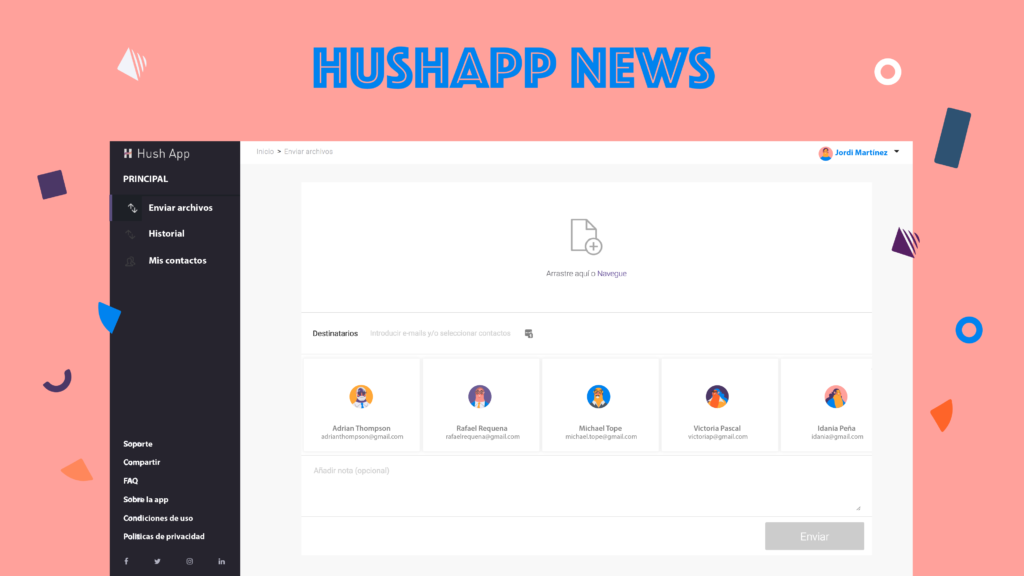
After logging into the web, either with your email and passphrase or with one of the available social accounts, you will enter the main screen to make your submissions. You then will be able to attach files to send to others via email. You will also notice that you can see in the middle of the screen, the tabs of your contacts that you have previously added, and that if you wish to add an additional one in the “recipients” section, it will appear automatically. 

Start using HushApp today.
SIGN UP

When you have several contacts, you will notice a bar that you can slide to the right to see all the people added. Since they will be easily accessible, it will be painless for you to find the contacts to whom you want to send.

In addition, there is a new functionality to add contacts that are non-users of HushApp. If you would like to send documents to non-users you simply need to select the “recipients” section and create a password or passphrase. Then inform that contact of the password so that they can access your file.

Below the contacts, we have another new feature, a space to add a note, which is also sent encrypted. This new functionality is optional, but allows you to customize the message. Any details about transfer or additional information about the contents is recommended, however, HushApp users seeking to send to a non-user should not include the password or passphrase needed to access their files.

As a last step, just click on the send button and go! Your files have been sent securely, and no one other than you and the recipients you chose will be able to access the information.

People who seek to use applications prefer the process to be easy and efficient. At HushApp, we work every day so that when you need to send a secured document you can do so pleasantly and above all conveniently.

We invite you to try the new version of the HushApp web application …

Filed Under: HushApp News Tagged With: encryption, HushApp, HushApp web application, HushBox, send files, share files, zero knowledge

What is zero knowledge technology and why do we use it in HushApp?

August 31, 2018 by HushApp Team

What is zero knowledge technology and why do we use it in HushApp?

It is difficult to choose the appropriate ways to protect our information, each application may have stronger features than another. If you want to keep an intruder as far as possible away from your files, then there are options available in the market that can help you. This level of protection is known as zero knowledge technology, but, what is it? How does it work?

It is important to begin recognizing the protection type we want for our files. We have the ability to choose who does or does not access them, but our security sense depends on the trust we have in others. For example, how could we ensure that a hotel does not use the master key of your room to enter and rummage through your belongings and even steal them? There should be a method to ensure that the hotel will not use this key.

The same happens in the digital world, when entering a service, you need to enter a password. Traditionally the server already has a coded version of the password, if it matches, you can access the system. The problem is that the server also knows your password. This is where zero knowledge technology could help you …

How does it work?

Zero knowledge, or ZKP (Zero Knowledge Proof), is a protocol used in encryption systems. It is a method established for one of the parties to prove to another that a statement (usually mathematical) is true, without revealing anything other than the truth of the statement.

To put it in simpler words, zero-knowledge technology uses encryption schemes that show if someone knows something without revealing what it is. For example, this is similar to when someone knows the answer to a riddle but does not reveal the solution. How can you prove that they really know the solution?  

Start using HushApp today.
SIGN UP

There are two fundamental parts involved in this process, the “tester” who knows the information and the other, in this case the “verifier” who is convinced that the tester knows the information in question. To verify this, the ZKP protocol follows three basic properties:

Totality: the tester can provide the correct information and the verifier will be convinced of the truth of what he receives. Taking it to the digital world, a tester could be a user who places his password in an application, the application (verifier in this case) will receive the password of the tester (the user), without needing to know it.

Solidity: The only way to convince the verifier, is entering the correct information (or the correct password).

Zero Knowledge: The verifier knows that it is the correct information, but can not know the password.

A unique feature of this system is that it not only shows that it knows something to its interlocutor without revealing it, but if someone simply observes, they cannot verify or know anything about this procedure.

The interesting thing about ZKP is that it is a form of authentication where passwords are not exchanged, which means that service providers do not know anything about the data they store on their servers. It is also included in our HushApp!

HushApp and Zero Knowledge Technology

One of the most interesting HushApp features is that we use this technology to give greater protection to your confidential information. With this, you are certain that we do not have access to your information, passwords, or the files you store or send.

With this you get a more secure communication because only the user knows what he is communicating or what files they are sharing. When not storing your password, it is very important that you memorize it or keep it in a safe place, since if you lose or forget it, you will not have a way to recover it.

We invite you to protect your files easily and safely.

Try HushApp …

Filed Under: HushApp News Tagged With: encryption, HushApp, password, send files, share files, zero knowledge, Zero Knowledge Proof, ZKP

logo HushApp made in EU

HushApp allows to protect and send files safely without complications, in any platform. Sign up for HushApp and enjoy the peace of mind of end-to-end encryption.


Product
Features Pricing Android App iOS App coming soon Web App
Users
Book a demo FAQ Guide Support
Business
Hush for Business GDPR Use cases
About
About us Jobs Terms of Use Privacy Policy Legal
This website uses cookies to improve your experience. We'll assume you're ok with this, but you can opt-out if you wish.Accept Read More
Privacy & Cookies Policy
Necessary Always Enabled